
Appearance
Scripts
Last updated
Scripts are JavaScript programs that run on the appliance, inside the Scada.Ink API process. They keep running when nobody is logged in and no browser is open. A script can read and write tags, read and write Data Tables, run named queries, call HTTP services, send email, query the historian, start workflows and ladder tasks, and (when an administrator saved it) manage users and take backups.
Scripts, workflows or ladder?
| Use | When |
|---|---|
| Ladder logic | Repeating machine logic re-evaluated every scan: interlocks, timers, counters, sequences. Not for safety functions — there is no real-time guarantee. See Ladder Logic. |
| Workflows | Event-driven steps someone else should be able to read: "when X, wait, notify, write". See Workflows. |
| Scripts | Anything that needs real code: parsing a device's text reply, loops over many tags, calculations, calling a web service, writing structured rows, administration jobs. |
The three work together: a workflow can run a script with its Run Script node, and a script can run a workflow with workflows.run() or start and stop a ladder task with ladder.start().
Creating a script
- Open Scripts in the sidebar.
- Click New Script, type a name in the Script name... box and click Create. Names must be unique, ignoring upper/lower case.
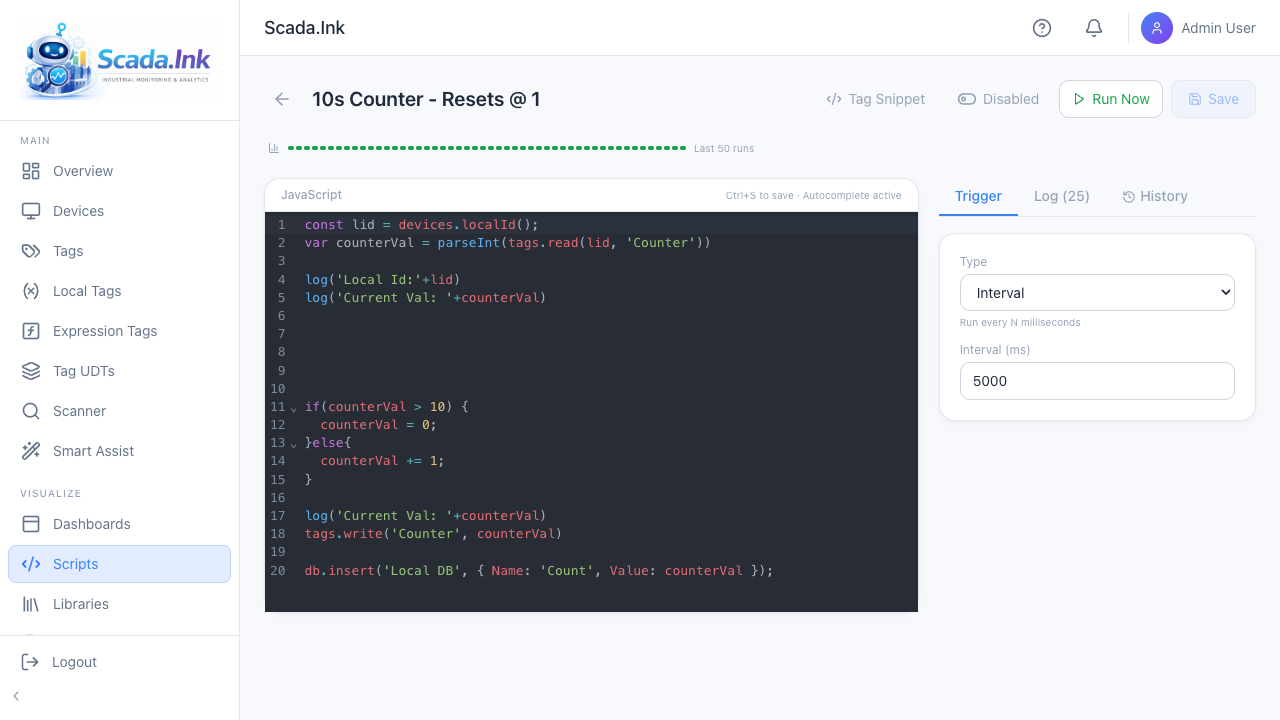
- The script editor opens. A new script has the Manual trigger, no code, and is disabled.
- Write your code in the JavaScript panel. Autocomplete offers the scripting API, tag paths, library exports and message names as you type.
- Pick a trigger on the Trigger tab (see Script Triggers & Context).
- Click Save (or press Ctrl+S).
- Click Run Now to test. The Log tab opens with the result.
- When it works, switch the toggle in the header to Enabled. It takes effect straight away; triggers only fire for enabled scripts.
The Scripts list
| Item | What it does |
|---|---|
| Colored dot | Last result. Hover for Last run: Success, Last run: Failed or Never executed. |
| Trigger and last run | The trigger type (Manual, Interval, Cron, Tag Change, Tag Threshold, Device Status, Startup, Shutdown, Message) and when it last ran. |
| Play button (Execute script now) | Runs the saved script once, like Run Now. |
| Calendar button (Schedule this script) | Opens the Schedules page with a new schedule for this script filled in. |
| Toggle (Enable script / Disable script) | Enables or disables the script and saves immediately. |
| Trash button (Delete script) | Asks Delete script?, then deletes the script and its run history. Only administrators see it. |
| Libraries | Opens Script Libraries. |
Clicking a row opens the editor.
The script editor
| Control | What it does |
|---|---|
| Name (top left) | Click to rename. Saved with Save. |
| Tag Snippet | Browse devices and tags, pick an operation (read, read all, write, write device) and insert the matching line at the cursor, e.g. const value = tags.read(3, 'Spindle/Speed');. |
| Enabled / Disabled | Whether triggers fire. Takes effect as soon as you click it, without Save. |
| Run Now | Runs the last saved code once, as trigger manual, and switches to the Log tab. Unsaved edits are not run. Works even when the script is disabled. |
| Save | Saves code, name and trigger. Grayed out until something changes. Ctrl+S does the same. |
| Run sparkline | Above the editor: one bar per recent run (green completed, red failed), height roughly by duration. Hover a bar for status, duration and time. Shows the last 50 runs. |
| Trigger tab | Trigger type and its settings. |
| Log (n) tab | The 25 most recent runs, newest first. Click one to see its error, every logged line (or No output) and Duration. Clear Log deletes the run history for this script. |
| History tab | Saved versions of the code. A version is stored each time you save changed code; the newest 50 are kept. Restore puts that version back as the current code. |
The help button in the page header opens a short guide and a quick API reference with examples.
Saving and what happens next
- Saving restarts the script's trigger with the new settings. An Interval timer starts counting again from the moment you save.
- The code itself is read from the database at the start of every run, so a running trigger always uses the latest saved code.
- Libraries are loaded at the start of every run too, so a library change reaches every script on its next run.
- Scripts are server-side: closing the browser does not stop them. Restarting the Scada.Ink service restarts every enabled trigger and runs the Startup scripts.
Who can do what
| Action | Roles |
|---|---|
| See the Scripts pages | Anyone whose page access includes Scripts (see Users). Non-admins only see scripts their resource permissions allow. |
| Create, edit, save, enable/disable, restore a version, clear the log | admin, editor |
| Run Now / execute | admin, editor; operator only when Operators can run this is ticked on the script, or they have a run grant on a restricted script |
| Delete | admin |
Use users.* and system.backup() inside a script | Only when the script's code was last saved by an administrator. See Scripting API Reference. |
Letting an operator run a script. Tick Operators can run this in the script editor's Trigger panel. It is off to begin with, because a script runs with the authority of whoever last saved it: a script saved by an admin can do admin things when an operator presses the button. Tick it only for scripts meant for an operator's Button, and remember that ticking it lets every operator run that script, from a button or straight from the API. For narrower access, make the script Restricted and grant run to particular people (see Per-User Feature and Resource Access). Viewers cannot run scripts.
Limits at a glance
- 30 seconds wall-clock per run, counting time spent waiting in
await— several sleeps or slow requests in the same run can still add up to a timeout even though each one individually stays under 10 s. - 10 seconds per
http.*request and persleep()call. db.query()limitis capped at 1000 rows.- 128 MB of memory per run. A run that goes over is stopped with a memory error.
- Each API call (
tags.read,db.query,log…) now makes a short round trip to the API, so a loop over thousands of single reads is slower than before — prefertags.readAll,tags.readBatchand named queries to do the work in one call. httpobeys two per-script switches, Internet and Plant network, plus an appliance-wide master switch — see http — call web services and Script Sandbox, Limits & Errors.
Details, errors and troubleshooting are in Script Sandbox, Limits & Errors.
API endpoints
| Method | Path | Purpose |
|---|---|---|
| GET | /api/scripts | List scripts |
| POST | /api/scripts | Create a script (admin, editor) |
| GET | /api/scripts/:id | Get one script |
| PUT | /api/scripts/:id | Update name, code, trigger, enabled (admin, editor) |
| DELETE | /api/scripts/:id | Delete (admin) |
| POST | /api/scripts/:id/execute | Run now; body { "params": { ... } }, or no body (admin, editor; operator per the setting above) |
| PUT | /api/scripts/:id/enable | Enable/disable; body { "enabled": true }, toggles when omitted (admin, editor) |
| GET | /api/scripts/:id/executions | Run history; ?limit= (default 25) |
| DELETE | /api/scripts/:id/executions | Clear run history (admin, editor) |
| GET | /api/scripts/:id/versions | Saved versions (newest 50) |
| POST | /api/scripts/:id/versions/:versionId/restore | Restore a version (admin, editor) |