
Appearance
Local Tags
Last updated
Local tags are variables that live on the appliance instead of in a device. Use them for operator inputs and setpoints from dashboards, counters and totals kept by scripts or ladder logic, status flags shared between workflows, the current recipe or order number, and values an external system writes through the API.
They behave like any other tag: dashboards, alarms, history, scripts, workflows, ladder logic and OPC-UA can all use them.
The Local Tags device
When the API starts it makes sure a device called Local Tags exists (driver local, 127.0.0.1). Every local tag is a subscription on that device, so:
- its device id is the Local Tags device's id, not a fixed number (look it up on Devices, or call
devices.localId()in a script); - it appears in tag pickers under Local Tags, and in the Tag Browser;
- its History checkbox is on Devices → Local Tags → Manage Tags (there is no history switch on the Local Tags page).
Don't delete the Local Tags device; it is recreated empty at the next restart and the old tags are gone.
The appliance keeps its own ladder, workflow and script status tags on this device too, in the _STATUS/ folder. They are read-only in practice — see System Status Tags.
Creating a local tag
- Open Local Tags in the sidebar.
- Click New Tag (it changes to Cancel while the form is open).
- Fill in Create Local Tag and click Confirm.
| Field | What it does | Default / rules |
|---|---|---|
| Tag Path (required) | Unique path, e.g. counter/total or line1/setpoint. Slashes are allowed. | Required; spaces trimmed from the ends. Duplicate: "Tag already exists". Clashes with a UDT instance member: "Tag path conflicts with UDT instance …". |
| Display Name | Friendly label. | Blank uses the tag path. |
| Data Type | Under Primitives: float, int, string, bool. Under UDT Types (when any UDT exists): choosing a UDT switches the form to Create UDT Instance. | float |
| Default Value | The tag's value when created, and the value it resets to on restart when not persistent. | Blank means 0 for float/int, false for bool, empty for string. Not checked against the type. |
| Persist | Keep the last written value across restarts. | Off |
The hint under the form reads: Persist: tag keeps its value across restarts. Non-persistent tags reset to their default value on restart.
The tag list
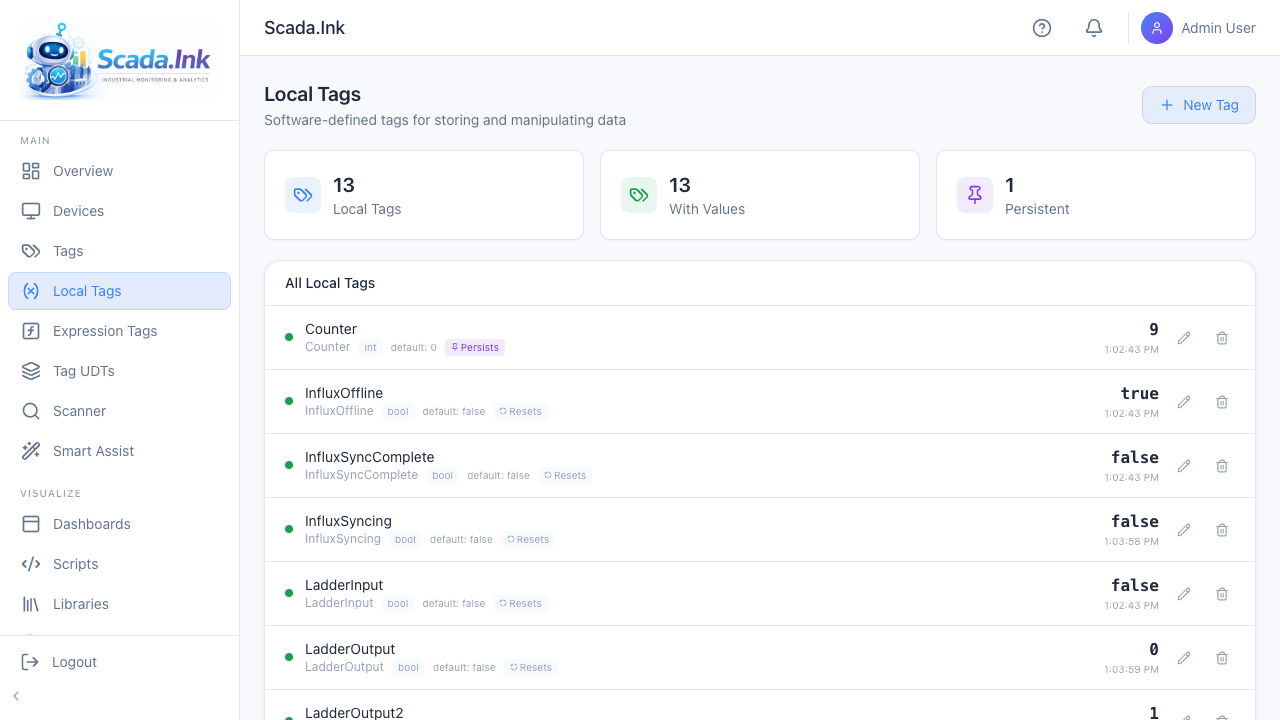
Summary cards: Local Tags (count), With Values, Persistent. Under All Local Tags each row shows:
| Item | What it does |
|---|---|
| Quality dot, name, path | Local tags are always good quality once written. |
| Type badge | Hover for Decimal number, Whole number, True / False or Text string. |
| default: X | The default value. |
| OPC-UA / OPC R / OPC R/W pill | Click to open the OPC-UA options. See Writing Tag Values & OPC-UA Exposure. |
| Persists / Resets switch | At the right of the row, before the value, set apart from the name and path. Click it to toggle persistence; it saves immediately. Only admins and editors can change it; other roles see it greyed out. |
| Value and time | Current value and when it was last written. The list also refreshes every 5 seconds. |
| Pencil (Write a new value) | Type a value and press Enter or click the check mark. Shown to admins, editors and operators. If the write is refused (for example by the tag's write security level), an error notification gives the reason and the edit box stays open. |
| Shield (Security levels for writing and editing this tag) | Admins only. Sets the minimum level to write or edit the tag. See Security Levels and Tag Permissions. |
| Trash (Delete this tag) | Admins only. Asks Delete local tag? before deleting. |
Persistence and restarts
- Every write saves the value to the appliance database, whether or not the tag persists.
- On startup, a persistent tag is restored to its last written value. A non-persistent tag is reset to its Default Value.
- Values are restored before scripts, workflows and alarms start, so restoring does not fire their tag-change triggers. History-enabled tags do record the startup value.
- A persistent tag with no written value yet starts at its default.
Tip: Persist setpoints, recipe numbers and running totals. Leave "request" and "trigger" flags (e.g.
cmd/start) non-persistent so a restart doesn't replay a command.
Permissions
- View the page: Local Tags page access, any role.
- Create, edit, toggle persist, OPC-UA settings: admin or editor. Operators and viewers don't see New Tag, and the Persists / Resets and OPC-UA pills are read-only for them.
- Write a value: admin, editor or operator, and the tag's write security level if it has one. Viewers don't see the pencil.
- Delete: admin only. Other roles don't see the trash icon.
Using local tags
| From | How |
|---|---|
| Dashboards | Bind to the tag in the tag picker under Local Tags; input widgets write local tags directly. |
| Scripts | tags.read(devices.localId(), 'counter/total'), tags.write('counter/total', 42). tags.write always targets the local device and does not check the tag exists. |
| Workflows | Read Tag / Set Tag with device Local Tags. |
| Ladder logic | Device Tag operand, device Local Tags. See Tags and Addresses. |
| Custom pages | scadaink.subscribe(localId, 'counter/total', cb) with the numeric id; scadaink.write('counter/total', 42). |
| Expressions | {<localId>:counter/total} |
Note: Local tags don't do type conversion, range limits, scaling or deadband. If an operator can type into a widget bound to a numeric tag, validate the value where you use it (a numeric input widget's min/max, or a check in the script).